How I Automated My Website's Contact Form with Make and Notion
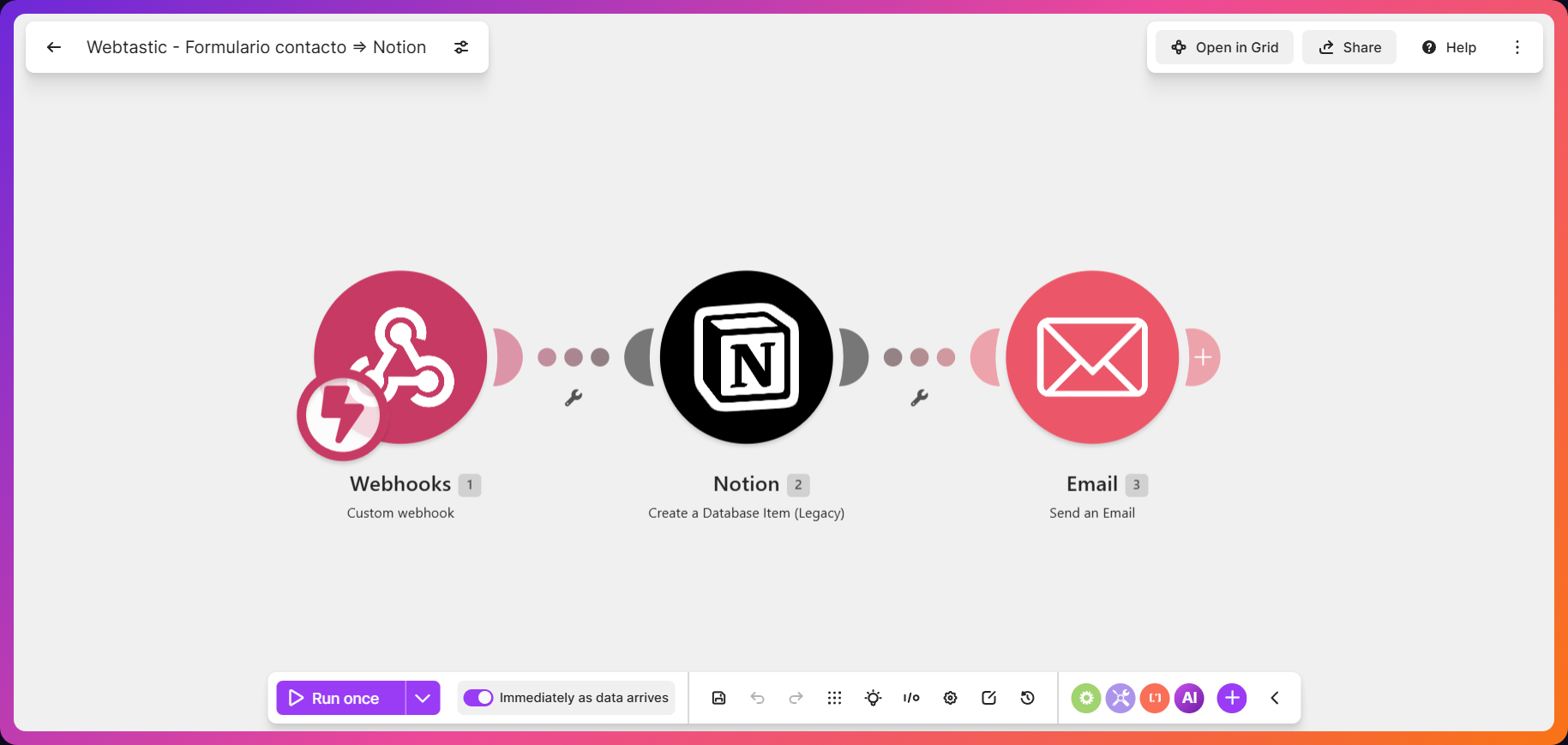
Every message that comes in through webtastic.es's contact form gets saved, already organized, in a Notion database and triggers an automatic confirmation email — without anyone having to check their inbox by hand. I built it with Make (formerly Integromat), a no-code automation tool that connects the website's form to Notion.
The problem this solves
When a small business gets inquiries through a web form, the usual routine is that someone has to check the inbox, copy the details somewhere (a spreadsheet, a notebook, their memory) and reply by hand. Once you hit a certain volume, something slips through: a message that never gets read, a customer who doesn't get a confirmation and assumes nobody bothered to reply.
That's exactly the step I cut out of my own website.
How it works, step by step
- Someone fills out the contact form at webtastic.es/contacto.
- The form sends the data to a Make webhook the moment it's submitted.
- Make automatically creates a new row in the Notion "Web Contacts" database, with every field (name, email, message, date) already organized.
- Make fires off a confirmation email right away, sent from hola@webtastic.es.
- I get the contact already sorted in Notion, without having to keep an eye on my inbox.
Why this isn't a generic plugin
Any off-the-shelf contact form sends you an email and that's the end of it. The difference here is that the automation is built around my specific process: the structure of the Notion database matches how I actually work afterwards (what I check first, which fields I need), and the confirmation email is written in the brand's real voice, not generic autoresponder copy. That's what separates a useful automation from a plugin that does the same thing for everyone.
Do you need to know how to code to build something like this?
No. Make is a "no-code" tool: instead of writing code from scratch, you connect pieces visually (the form, Notion, the email) and define what happens with each piece of data. What you do need is clarity on what to automate and how to structure it so it fits the way you work — that part isn't something you pick up from a one-afternoon tutorial, and it's what separates an automation that genuinely helps from one that just adds complexity.
What this means for your business
If your business gets inquiries through a form, WhatsApp or email and you're handling all of them by hand, there's probably a part of that process you could automate without losing control or your personal tone. Some common examples:
- Tracking leads without a separate spreadsheet
- Automatic booking or appointment confirmations
- Internal notifications when an order or request comes in
- Automatically saving a new customer's details to your CRM or database
- WhatsApp or email alerts when something needs your attention
It doesn't need to be complicated or expensive — it needs to be well thought out for your specific case.
FAQ
Is this the same as a WordPress form plugin?
Not exactly. A form plugin usually just sends an email and that's it. This automation also organizes every contact in its own database (Notion), structured around how each business actually works, not in a generic way.
Do I need to know how to code to automate my contact form?
No. Tools like Make let you build automations without writing code, connecting apps visually.
Does this work with any website, or only WordPress?
It works with any website that can send the form data to a URL (a webhook), which is something practically every website can do, regardless of what technology it's built with.
How much does it cost to automate a contact form?
It depends on the complexity, but simple automations like this one usually cost quite a bit less than the hours you'd otherwise spend managing contacts by hand every week.
What happens if the automation fails and the message doesn't get saved?
Make keeps a log of every run, including the ones that fail, so a message never just disappears without a trace — you can review it and resend it manually if needed.
Is your business still handling this by hand?
Tell me how you're doing it now and let's see if it can be fixed.
Let's talk